

In hosting accounts like AxSpace (using DirectAdmin), you can add different types of domains to your account. Each one works differently and is used for different purposes. In this article, we explain the main differences between Main Domain, Addon Domain, Parked Domain, and Subdomain in a simple way.
Stick with us!
Let’s first get familiar with the overall structure of a domain.
In general, every URL consists of several main parts. For example (excluding protocol parts like http:// or https://), consider this address:
The details of this address are as follows:
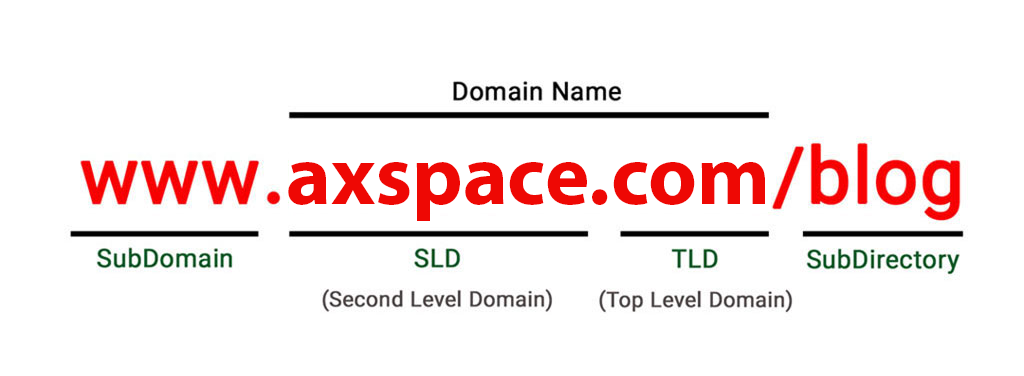
- Subdomain:
The first part from the left is the Subdomain. This section is always placed before the SLD. An interesting point is that in this example, www is considered a subdomain. On some websites, sections like blog or store are set up as: blog.domain.com or store.domain.com and treated as subdomains.
Usually, a subdomain is a separate section of a website that is derived from the main website. This part can be multi-level or include hyphens (-) or dots (.).
- SLD (Second Level Domain):
The second part is the SLD, which comes right before the TLD. This section is basically considered the main name of the domain. In this example, axspace is the SLD.
Together with the TLD, this part creates a unique name. If the domain is available, it can only be registered once. That means no one else can register the exact same name later.
- TLD (Top Level Domain):
The third part is the TLD, or domain extension. This section comes after the last dot in the domain name. In this example, .com is considered a TLD.
AxSpace offers more than 20 different domain extensions, so you can now choose and purchase the domain extension you want right away.
- SubDirectory:
This part shows the different folders (or paths) inside a website. Folders basically represent the various sections of a site, like its pages, posts, categories, or other content areas.
Any section that comes after the domain name (starting with a /) is considered a SubDirectory. For example, in www.axspace.com/blog, the /blog is the SubDirectory — it points to a specific folder or page on the site.
In short: SubDirectories help organize and direct visitors to different parts of your website.
What is a Main Domain and an Addon Domain?
The Main Domain is the primary domain that gets added to your hosting account. When you buy hosting, you need to connect this domain to your host.
Domains that are connected to your hosting are generally divided into two types:
- Main Domain (the first and primary one)
- Addon Domain (additional domains you add later)
The good news is that for each domain — whether it’s the main one or an addon — you can create a completely separate website.
In DirectAdmin, go to the “Account Manager” section, then “Domain Setup”. There you can view, edit, or manage both your Main Domain and any Addon Domains you have added.
In general, in DirectAdmin, the features and settings for Main Domains and Addon Domains are exactly the same. They both get their own folder, can have separate files, emails, databases, and behave like independent sites.
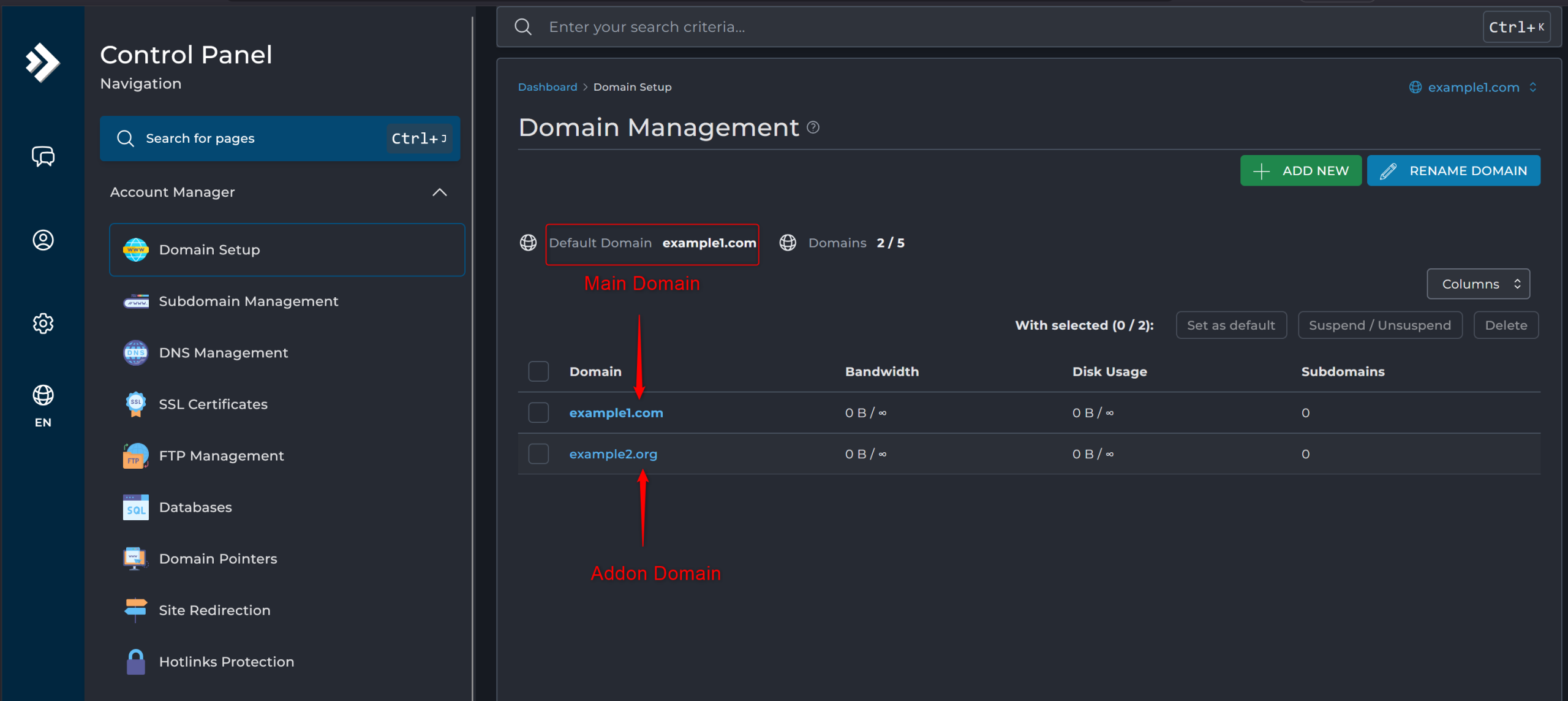
The only real difference is that the Main Domain is the one you set up first, while Addon Domains are extra ones you add afterward .
What is a Parked Domain?
A Parked Domain (also called Domain Pointer or Alias) is used when you want the same content to be available under multiple different domain names at the same time.
In simple words: When someone types in a parked domain like domain1.com, it loads and shows the exact same content as your main domain (for example, domain2.com). No new website or files are created — it just points to the main domain’s content.
In DirectAdmin (on AxSpace hosting), parked domains can work in two ways:
- Pointer (default): When someone visits the parked domain, the browser address bar usually changes to show the main domain’s name (it redirects or mirrors without keeping the parked name visible).
- Alias (if you check the box): If you select the option “Create as an Alias” when setting it up, the parked domain name stays in the browser’s address bar. Visitors see domain1.com, but the content comes from domain2.com.
Important points:
- The domain you want to park must be pointed to your AxSpace hosting (using AxSpace nameservers or the correct IP).
- You park it on top of your Main Domain or an existing Addon Domain.
- This is great for:
- Using multiple extensions (yourdomain.com + yourdomain.net)
- Protecting common typos (yourdomain.com + yourdomian.com)
- Keeping an old domain after a rebrand (oldname.com shows newname.com content)
To set it up in DirectAdmin:
- Go to Account manager > Domain Pointers.
- Click on CREATE DOMAIN PONTER.
- Decide if you want it as an Alias (check the box if you want the parked name to stay visible).
- Click CREATE.
No extra folder is created; everything loads from your main site’s public_html.
This is a simple and useful way to use extra domains without building separate sites.